

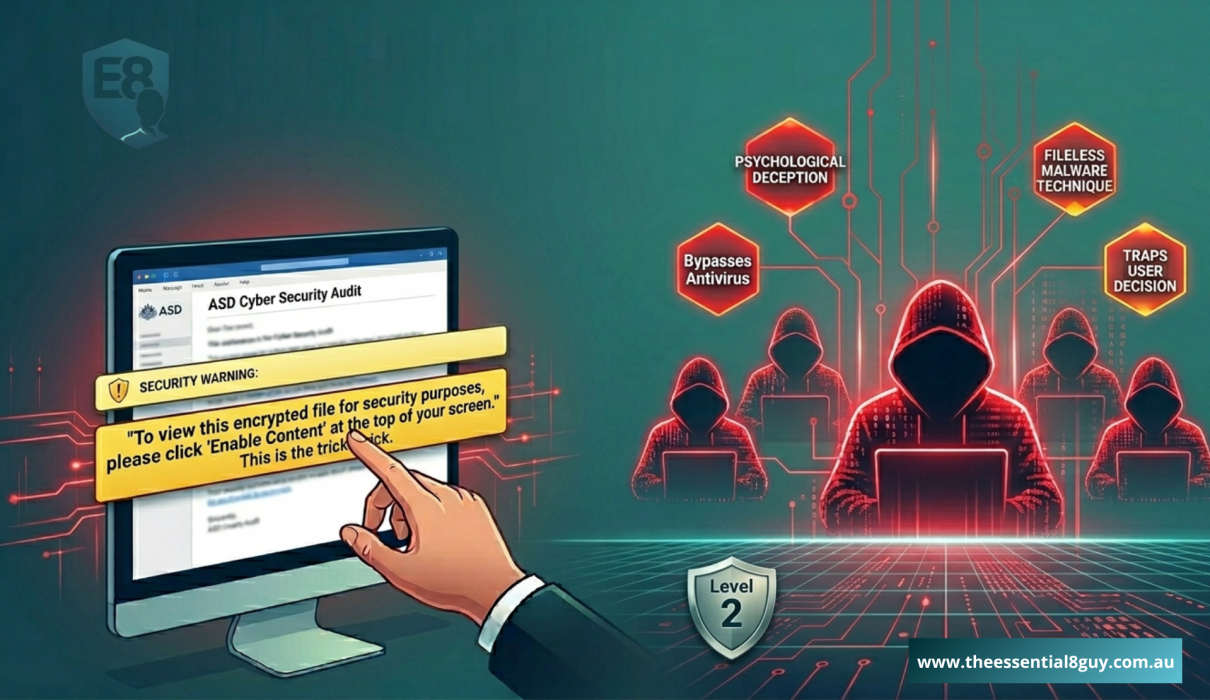
Executive Summary: In the complex panorama of 2026 Australian business, we often obsess over high-tech AI breaches and shadowy foreign hackers. Yet, the most effective backdoor into your organization remains one of the oldest and most overlooked: poorly configured Microsoft Office macro settings. This article explores why the “Enable Content” bar is a psychological trap, the technical mechanics of the threat, and how a Strategic Security Advisor ensures your team never has to make a high-stakes security decision again.
The Anatomy of the “Enable Content” Trick
Imagine a typical Tuesday morning in your Sydney or Melbourne office. Your finance manager receives an email that looks exactly like a legitimate ASD Cyber Security Audit request or a high-priority invoice from a known vendor. The branding is perfect, the sender’s name is familiar, and the attached Word document is titled “Urgent_Strategic_Summary_Q2_2026.”
They open the file. Instead of the data, they see a blurred image and a yellow bar at the top of the screen:
“Security Warning: Macros have been disabled. [Enable Content]”
The document instructions are clear… “To view this encrypted file for security purposes, please click ‘Enable Content’ at the top of your screen.” This is the trick. The moment they click that button, they are not just opening a file; they are granting malicious macros permission to bypass every security layer you’ve installed. They have effectively handed the keys to your kingdom to a stranger because they were “tricked” into thinking it was a standard administrative step.
Strategic Reading – Explore Why 2026 is the Year Your Identity Becomes Your Vulnerability to understand the shift in modern threat tactics.
Mastering Microsoft Office Macro Settings for the Essential Eight
As part of the Essential Eight Maturity Level 2 framework, managing Microsoft Office macro settings is a core pillar. For many Australian business owners, it feels like a relic of the early 2000s. However, to achieve ACSC Compliance in 2026, you must look at how these settings are enforced across your fleet.
The Three Levels of Macro Maturity
- Maturity Level 1 (The Basic Block): You turn off macros for everyone. The problem? Your internal Excel sheets for payroll or inventory stop working. This leads to “Shadow IT,” where frustrated staff find workarounds that are even less secure.
- Maturity Level 2 (The Strategic Filter): This is the gold standard for Essential Eight Maturity Level 2. We block all macros originating from the internet but allow Trusted Publishers and Digital Signatures from your own organization.
- Maturity Level 3 (The Zero Trust Model): Macros are only allowed to run in a “Sandboxed” environment where they cannot touch the rest of your network, even if they are malicious.
The Technical “Why”- How Malicious Macros Bypass Antivirus
Many business owners ask: “Doesn’t my antivirus catch this?” In 2026, the answer is often no.
Malicious code hidden within Microsoft Office macro settings often uses “Fileless Malware” techniques. Instead of saving a virus to your hard drive, the macro tells your computer’s own legitimate tools (like PowerShell) to perform harmful actions. Because the computer trusts PowerShell, the antivirus sees it as “normal business activity.” This is why restricting the environment via Microsoft Office macro settings is a mechanical necessity, not an optional extra.
The MSP Difference—Control vs. Chaos
As a Strategic Security Advisor, we often hear: “We don’t use macros, so we are safe.” The reality is that you don’t choose to use macros; the hackers choose them for you. If your Microsoft Office macro settings are not explicitly configured to block “untrusted” code, the “backdoor” is standing wide open.
Deep Dive Insight – Macro security is just one piece of the puzzle. See how it fits into the broader framework in our guide: Essential 8 Maturity Level 2: The New Resilience Standard.
The “Strategic” Solution (Using Microsoft Intune)
We use Microsoft Intune configuration profiles to create a silent, invisible shield.
- The Experience: When your employee opens a malicious file, the “Enable Content” button simply doesn’t appear. There is no choice to make. No “trick” to fall for.
- The Business Continuity: Your internal, trusted spreadsheets continue to work perfectly because we have “signed” them as safe within your organization’s tenant.
This is the shift from Reactive IT (fixing the breach after the click) to Strategic Security (preventing the click from ever being an option).
The Hidden Risk of “Macro-Only” Security
Focusing solely on macros is a common mistake. A truly strategic defense looks at how Microsoft Office macro settings interact with other pillars. For example, if a macro does manage to execute, its damage is limited by who is running it.
Critical Security Check – Learn how to neutralize this risk in The Privilege Paradox – Why Restricting Admin Rights is the New Frontline.
The Cost of Complacency – A 2026 Reality Check
In Australia, the average cost of a small business data breach has climbed significantly. Beyond the immediate financial loss, there is the Reputational Damage. If a client discovers their data was stolen because a staff member clicked “Enable Content,” they don’t blame the staff member—they blame the organization’s lack of Strategic foresight. Properly configured Microsoft Office macro settings are an insurance policy for your brand’s integrity.
Strategic Implementation
To move beyond “basic security” and into “resilience,” we implement a four-step professional transition:
- Macro Audit: We identify which legitimate macros your business actually needs for daily operations.
- Code Signing: We help you implement a “Trusted Publisher” model using internal certificates.
- Microsoft Intune Configuration: We push your Microsoft Office macro settings to every device, whether they are in the office or working from a café.
- Continuous Monitoring: We watch for blocked attempts and refine your Attack Surface Reduction (ASR) rules to ensure zero business disruption.
Take Action – Is Your Backdoor Locked?
If you are not 100% sure how your Microsoft Office macro settings are managed, you are likely at risk. This is not about buying new software, it’s about Strategic Configuration.
Ready to move to Maturity Level 2? The threat situation in Australia is moving faster than ever. Stay informed. Stay defended.
DM ME today with the keyword “STRATEGIC” or reach out for a confidential ASD Cyber Security Audit. Let’s ensure your “Identity” remains your strength, not your vulnerability.